NDEV + PhoneGap
Reference Implementation using the Android SpeechKit SDK

Overview
We are pleased to provide you with a reference implementation of a PhoneGap plugin that integrates Nuance’s NDEV mobile speech SDKs.
Please Note This code is intended to show how a PhoneGap plugin can be created utilizing the NDEV SpeechKit framework. This is not 1:1 to the SpeechKit API, and was tested successfully for the version of SpeechKit defined in the version support section below.
Getting Started
Take the following steps to compile the sample Android PhoneGap project
-
Create an application on the NDEV portal
-
Clone the PhoneGap Sample code for Android
-
Import the project into your IDE
-
Download and integrate the Android SpeechKit framework
-
Supply credentials and launch
Download PhoneGap Sample
git clone git@github.com:NuanceDev/ndev-phonegap-android.git
OR
Downloading SpeechKit
Please go to the NDEV portal and download the appropriate SDK.
Importing the Sample
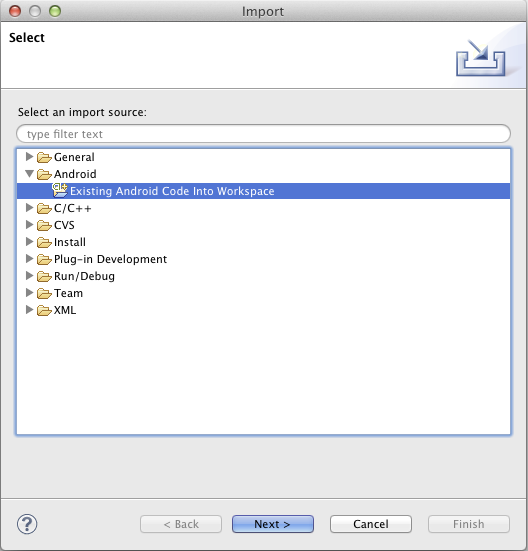
To get started with the NDEV PhoneGap sample, import the project in your choice of IDE. Screenshots will be shown of Eclipse on a Mac.
Import into Eclipse
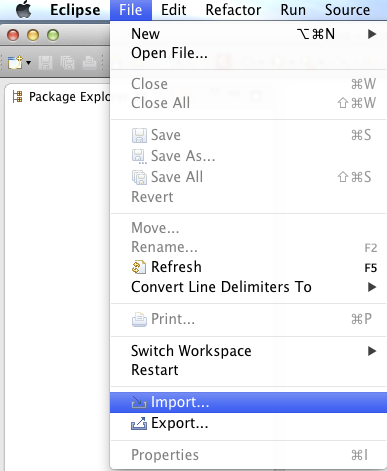
Select Existing Android Project
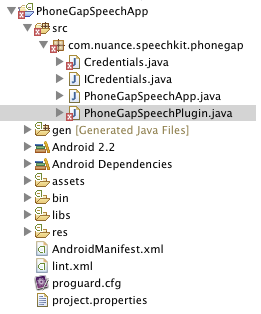
The Outcome
Integrating SpeechKit
After downloading the Android SpeechKit SDK, add the following files into the appropriate locations
| File | Destination |
|---|---|
nmsp_speech_kit.jar | libs/ |
libnmsp_speex.so | libs/armeabi/ |
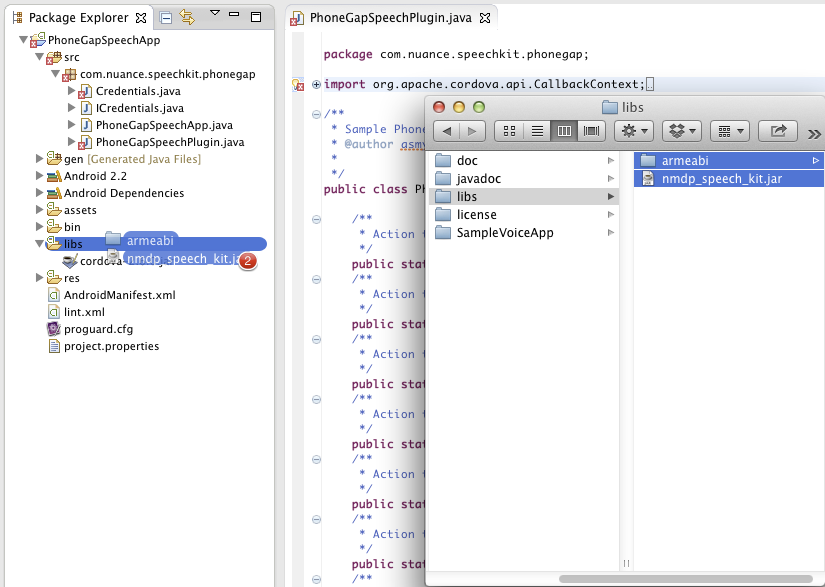
For more in depth documentation on the SpeechKit SDK, please refer to the NDEV website.
Supplying Credentials
After adding nmsp_speech_kit.jar and libnmsp_speex.so to your project, you will need to supply your app’s credentials.
Navigate to src/com/nuance/speechkit/phonegap/Credentials.java.
Provide the following
- SpeechKit Application Key
- NDEV Application ID
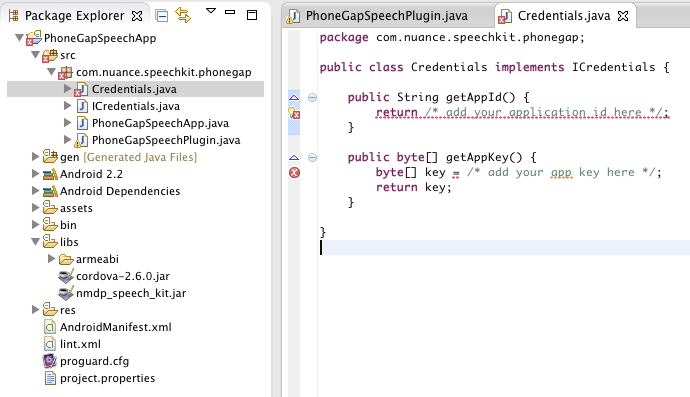
Navigate to /assets/www/js/sample.js and provide the following
- Server URL

Project Structure
Here’s a high level snapshot of how the project is set up
PhoneGapSpeechSample
	├── AndroidManifest.xml
	├── assets
	│   └── www
	│       ├── cordova-2.6.0.js
	│       ├── index.html
	│       ├── nuancespeechkit.js
	│       ├── sample.css
	│       ├── sample.js
	│       └── transparent.png
	├── bin
	│   ├── AndroidManifest.xml
	│   ├── res
	├── gen
	├── libs
	│   ├── armeabi
	│   │   └── libnmsp_speex.so
	│   ├── cordova-2.6.0.jar
	│   └── nmdp_speech_kit.jar
	├── res
	│   ├── drawable-hdpi
	│   ├── drawable-ldpi
	│   ├── drawable-mdpi
	│   ├── layout
	│   │   └── main.xml
	│   ├── values
	│   │   └── strings.xml
	│   └── xml
	│       └── config.xml
	└── src
	    └── com
	        └── nuance
	            └── speechkit
	                └── phonegap
	                    ├── Credentials.java
	                    ├── ICredentials.java
	                    ├── PhoneGapSpeechApp.java
	                    └── PhoneGapSpeechPlugin.java
The web implementation is within the /assets/www/ directory, and the app logic itself is in /assets/www/js/sample.js.
Plugin Interface
The plugin code is located in
/com/nuance/speechkit/phonegap/PhoneGapSpeechPlugin.java
The plugin configuration file is located in
/res/xml/config.xml
The JavaScript plugin code is located in
/assets/www/js/nuancespeechkit.js
Initializing SpeechKit
When the app has launched and the deviceready is triggered, you can initialize SpeechKit.
This specific implementation requires the following arguments:
- Credentials Class, the name of the class defined in the
Plugins/directory - Speech Kit Server
- Port
- Enable SSL
- Success Callback
- Failure Callback
function initSpeechKit(){

    var credentialsClass = "Credentials";
    var speechKitServer = "[server-url]";
    var port = 443;
    var enableSSL = false;
    var successCallback = function(result){};
    var failureCallback = function(result){};

    speechKit.initialize(
                  credentialsClass,
                  speechKitServer,
                  port,
                  enableSSL,
                  successCallback,
                  failureCallback);

}
Speech Recognition
The NDEV SpeechKit PhoneGap interface exposes two recognition related methods startRecognition and stopRecognition on the global element speechKit.
Provided that SpeechKit has been initialized, the startRecognition will begin to capture audio for ASR given the following parameters:
- Recognition Type
- Recognition Language
- ASR Callback
- Failure Callback
    function startRecognition(){

        // State: listening
        var recognitionType = "dictation";
        var recognitionLanguage = "en_US";
        var asrCallback = function(result){
            // switch on `result.event`
            //    'RecoVolumeUpdate', 'RecoComplete'
            console.log(result);
        };
        var failureCallback = function(error){
            // switch on `error.event`
            //    'RecoStopped', 'RecoError'
            console.log(error);
        };
        speechKit.startRecognition(
                        recognitionType,
                        recognitionLanguage,
                        asrCallback,
                        failureCallback );

    }
If you have endpoint-detection enabled, the system will not need to trigger an explicit stopRecognition request. However, if you do not have endpoint-detection enabled, or you simply want to stop the request, you will want to explicitly trigger it with the following parameters:
- Success Callback
- Failure Callback
    function stopRecognition(){

        var successCallback = function(result){
            console.log(result);
        };
        var failureCallback = function(error){
            console.log(error);
        };

        speechKit.stopRecognition(
                        successCallback,
                        failureCallback);

    }
Text To Speech
The NDEV SpeechKit PhoneGap interface exposes two synthesis related methods playTTS and stopTTS on the global element speechKit.
Provided that SpeechKit has been initialized, the playTTS will begin to play the synthesized text given the following parameters:
- Text to synthesize
- Language
- Voice (optional if Language specified)
- TTS Callback
    function playTTS(){
        var textToSynthesize = "Test";
        var ttsLanguage = "en_US";
        var ttsCallback = function(result){
            // switch on `result.event`
            //    'TTSStarted', 'TTSComplete',
            //    'TTSPlaying', 'TTSStopped'
            console.log(result);
        };
        var failureCallback = function(error){
            // switch on `error.event`
            //    'TTSError'
            console.log(error);
        };
        speechKit.playTTS(
                    textToSynthesize,
                    ttsLanguage,
                    null,
                    ttsCallback,
                    failureCallback);
    }
To issue the explicit command to stop playing the synthesized text audio, you can invoke the stopTTS function.
    function stopTTS(){
        var ttsCallback = function(result){
            // switch on `result.event`
            //    'TTSStopped'
            console.log(result);
        };
        var failureCallback = function(error){
            // switch on `error.event`
            //    'TTSError'
            console.log(error);
        };
        speechKit.stopTTS(ttsCallback, failureCallback);
    }
Documentation
PhoneGap Related
SpeechKit API Related
Version Support
We can guarantee that given the versions defined below, the app will successfully compile and run.
| Dependency | Version |
|---|---|
| Apache Cordova | 2.6.0 |
| NDEV Android SpeechKit Framework | 1.4.2 |
| Android SDK | 2.2-4.2 |
If you have any questions, please visit our forum.